P&O has made your holiday even easier with their My Holiday app, as I have a mother in her 50s, she isn’t great with technology. This ones for you mum, as well as anyone else who may struggle.
You don’t need to pay anything as it is a free, onboard planner personalised to you. Available on your mobile or tablet, no internet access is required. Make your holiday that more magical, by managing your bookings and checking your on board account. Book a spa treatment whilst in bed or laying by the pool, or get a last minute table in one of P&Os Speciality Restaurants. Using the app isn’t a must, you can still make the holiday your dream without the app.
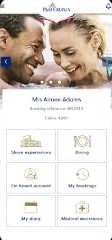
Across the fleet you can use the My Holiday app for the below things:
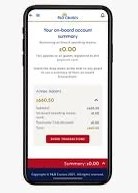
1. Keep track of your on board spending = no matter where you are on board you can access an up-to-date bill of your spending such as; drinks, shore experiences, spa treatments etc. As well as how much OBC you have left to use.
2. Book Shore Excursions = Stay up to date with the shore excursions so, you wont miss your jaw dropping adventures or standard town transfers. With the ability to book shore excursions throughout your cruise you cant miss out. There is a shore excursion desk on board. .
3. Book a slot in the Children’s Club = Since Covid, you need to book a slot to avoid being turned away if the Reef is busy.
4. Join Virtual queues or Book Speciality Restaurants = To avoid disappointment it is always best to book a table rather then show up that evening, especially for any special occasion. You don’t need to head to the restaurant to book a table, simply enjoy the entertainment and join a virtual queue, a notification will alert you when your table is ready.
5. Check Sample menus = Dining is endless onboard all ships, so making sure the restaurants suit your needs is a must. Giving you a an even better holiday. As well as menus, you can view other services such as, spa and salon treatments, room service, and bars.
6. Access your Bookings and your Diary = If you have multiple treatments, excursions etc booked, you can check your availability in a quick and convenient way. It is all listed in detail for each day you are on board, allowing you to not miss a thing.
My Holiday on each ship;
Arvia = Speciality Dining, OBC, Daily Horizon, Sample Menus, Shore Excursions, Children’s Clubs, Freedom Dining, and Entertainment.
Iona = Speciality Dining, OBC, Daily Horizon, Sample Menus, Shore Excursions, Children’s Clubs, Freedom Dining, and Entertainment.
Britannia = Speciality Dining, OBC, Daily Horizon, Sample Menus, Shore Excursions, Children’s Clubs, and Freedom Dining.
Ventura = Speciality Dining, OBC, Daily Horizon, Sample Menus, Shore Excursions, and Children’s Clubs.
Azura = Speciality Dining, OBC, Daily Horizon, Sample Menus, Shore Excursions, and Children’s Clubs.
Aurora = Speciality Dining, OBC, Daily Horizon, Sample Menus, and Shore Excursions.
Arcadia = Speciality Dining, OBC, Daily Horizon, Sample Menus, and Shore Excursions.
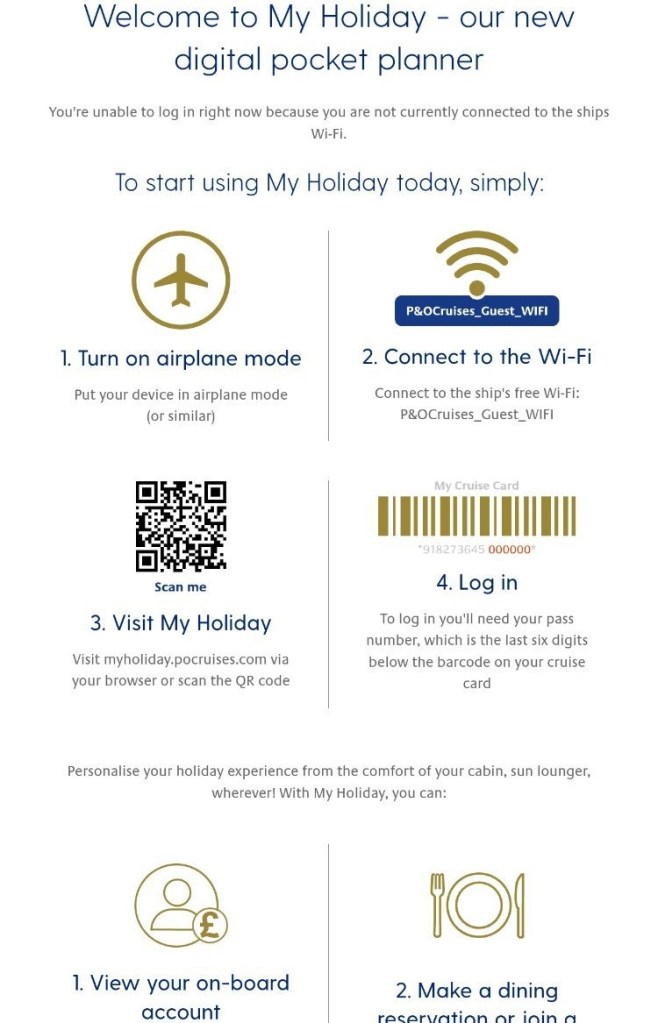
To download My Holiday there is a QR code on the back of the first Horizon when you board, this will take you to the app store to be able to download the app. Once downloaded simply add your last few numbers on your cruise card, then set up a code to log in. No matter if you are travelling for 4 nights to 99nights, My Holiday is available for everyone. If you struggle to set up the app, the reception team are always happy to help. I think it is a great way to optimize your experience on board to the fullest, no carrying round pieces of paper or worrying about your next booking, My Holiday takes all the pressure off of you.
 Jayestravellingadventures
Leave a comment